メインコンテンツへスキップ

NetApp ConsoleからCloud Volumes ONTAP(CVO)を手動でアップグレードする方法

Views:
37
Visibility:
Public
Votes:
0
Category:
netapp_console
Specialty:
ds_cvo
Last Updated:

環境

  • NetApp Console(BlueXP)
  • Cloud Volumes ONTAP(CVO)

概要

KBアーティクルでは、ConnectorからCloud Volumes ONTAPソフトウェアイメージを手動でアップグレードする方法について説明しています。

手順

  1. NetApp Support SiteからローカルワークステーションにCloud Volumes ONTAPソフトウェアイメージをダウンロードします[1]
  2. 認証情報を使用してConnector CLIにSSH接続し、以下の場所に移動して既存のONTAPイメージをすべて削除します:
    cd /opt/application/netapp/cloudmanager/docker_occm/data/ontap/images
  3. WinSCPなどのツールを使用して、新しいONTAPソフトウェアイメージをNetApp Console Agent(connector)VM上のローカルディレクトリ/tmpまたは/var/tmpにコピーします
  4. ONTAPイメージがアップロードされたディレクトリに移動し、以下のコマンドを使用してConnector CLIから推奨パスにイメージをコピーします:
    sudo cp <ONTAP_image_name>.tgz /opt/application/netapp/cloudmanager/docker_occm/data/ontap/images
  5. NetApp Consoleポータルで作業環境に入り、「⋮」省略記号 をクリックし、メニューから「ONTAPバージョンの更新」をクリックします:clipboard_ecc9827abf4cff30f6bae78b8eb2ca89d.png
  1. Cloud Volumes ONTAPアップグレードタブに以下の形式でHTTPパスを入力します
    http://<Connector_IP>/ontap/images/<ONTAP_image_name>.tgz
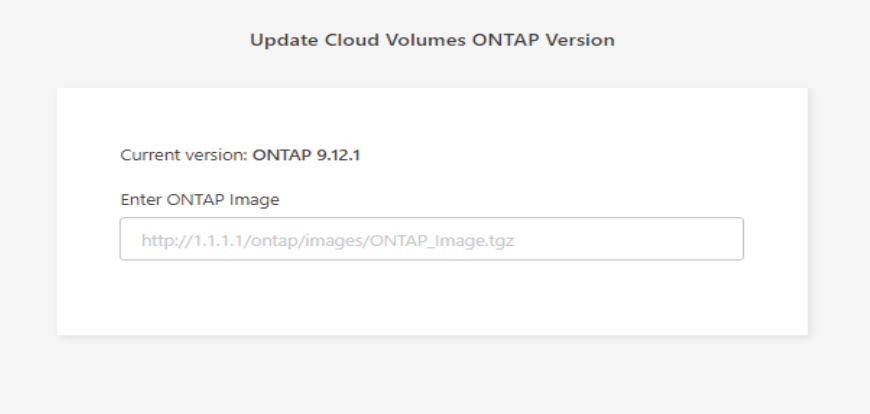
clipboard_e0caaffecd4dbcb408c96ebdf7dd0a445.png

  1. アップグレードボタンをクリックしてONTAPアップグレードを続行します。​​​


パートナーノート

partnerNotes_text
 

内部情報

内部情報

Sign in to view the entire content of this KB article.

New to NetApp?

Learn more about our award-winning Support

NetApp provides no representations or warranties regarding the accuracy or reliability or serviceability of any information or recommendations provided in this publication or with respect to any results that may be obtained by the use of the information or observance of any recommendations provided herein. The information in this document is distributed AS IS and the use of this information or the implementation of any recommendations or techniques herein is a customer's responsibility and depends on the customer's ability to evaluate and integrate them into the customer's operational environment. This document and the information contained herein may be used solely in connection with the NetApp products discussed in this document.