VMware vApp/OVA上のActive IQ Unified Managerからログ(サポートバンドル)を収集する方法
環境
- OnCommand Unified Manager 9.5以下(OCUM)
- Active IQ Unified Manager (AIQUM) 9.6+
- VMware Virtual Machine OVA
概要
- この記事では、vApp/OVAで実行されているOnCommand Unified ManagerまたはActive IQ Unified Managerでサポートバンドルを生成する手順について説明します。
- Active IQ Unified Manager 9.8以降、Generate Light Support Bundleのオプションが追加されました。
- Active IQ Unified Manager 9.8以降、テクニカルサポートケース番号を使用してサポートバンドルをNetAppに直接アップロードするオプションが追加されました。
- Active IQ Unified Manager 9.9以降、Web UIから軽量および完全なサポートバンドルを生成してアップロードできるオプションが追加されました。
手順
1.OVAのVMwareコンソールにアクセスします。これにはいくつかの方法があります。
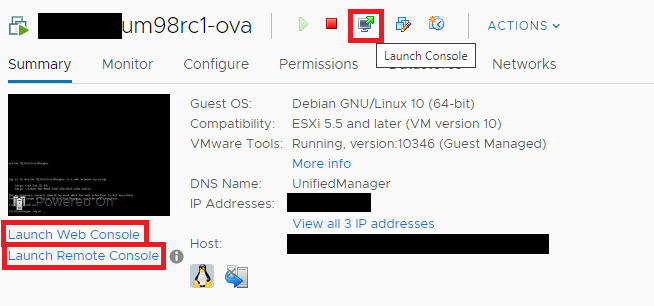
- vSphereにログインした状態で、Unified Manager仮想マシンを選択し、いずれかを実行します。
- 「Launch Console」ボタンをクリックします。
- 「Launch Web」コンソールリンクをクリックします。
- 「Launch Remote」コンソールリンクをクリックします。
- 仮想マシンを右クリックし、「Open Remote Console」をクリックします。
- または、メンテナンスユーザを使用してUnified ManagerサーバにSSH経由で接続することもできます。
ssh <maintenance-user>@<unified-manager-ip>
2.VMware Consoleからメンテナンスコンソールに接続したら、メンテナンスユーザとしてログインします。
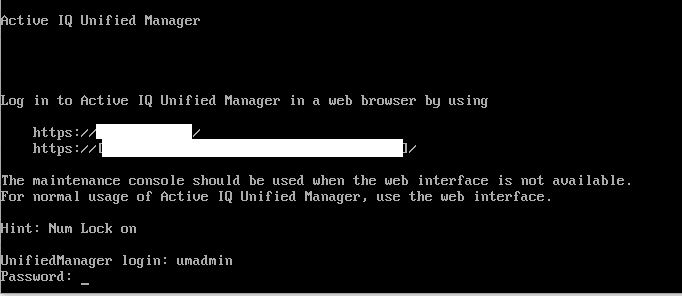
3.Support/Diagnosticsに4を選択します。
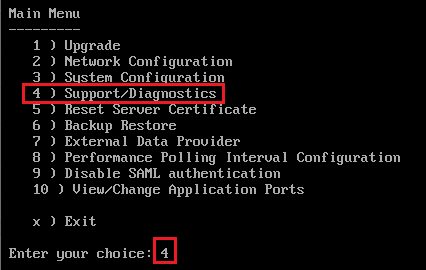
4. Generate Light Support BundleまたはGenerate Support Bundleを選択します
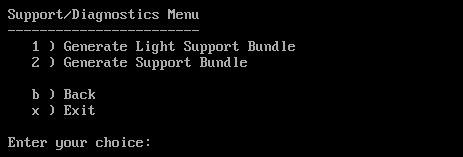
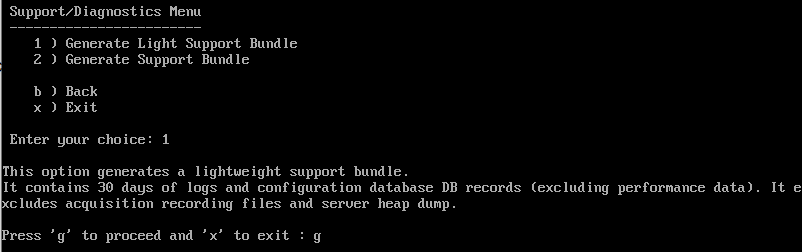
- Active IQ Unified Manager 9.8 以降、Generate Light Support Bundleのオプションが追加されました。
- この新しいオプションを使用すると、30日分のログと構成データベースレコードのみを含む軽量なサポートバンドルを作成できます。
- このオプションには含まれません:
- パフォーマンス データ
- 取得記録ファイル
- サーバーヒープダンプ
- 以前のバージョンのUnified Managerにはこの機能はありません。Active IQ Unified Manager 9.8以降でのみ、このメニューにこのオプションが表示されます。
5. [Generate Support Bundle]を選択した場合は、サポートバンドルに含めるオプションを選択または選択解除します。
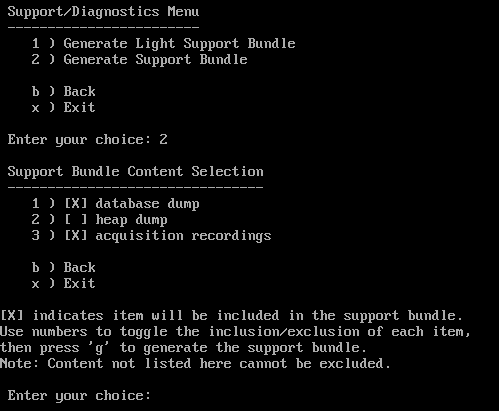
- database dump
- MySQL Serverデータベースのダンプ。
- heap dump
- 主要なUnified Managerサーバプロセスの状態のスナップショット。このオプションはデフォルトで無効になっており、カスタマーサポートからリクエストされた場合にのみ選択してください。
- 通常、非常に大きいサイズです。
- 人間が判読できません。
- サーバクラッシュのトラブルシューティングにのみ使用されます。
- acquisition recordings
- Unified Managerと監視対象クラスタ間のすべての通信の記録。
6.「g」と入力し、Enterを押して続行します。
注: サポートバンドルの生成はメモリを大量に消費する操作であるため、この時点でサポートバンドルを生成するかどうか確認するよう求められます。
7.「y」と入力し、Enterを押してサポートバンドルを生成します。
8.サポートバンドルにdatabase dumpファイルを含めた場合、データベースファイルを含める期間を指定するように求められます。各値を入力した後、Enterを押して続行します。
- 開始日を「YYYYMMDD」の形式で入力します。たとえば、2017年1月1日の場合は20170101と入力します。
- 統計を収集する期間(指定した開始日の午前0時からの日数)を入力します。1から10までの数値を入力できます。システムはデータベース統計が収集される期間を表示し、その後サポートバンドルを生成します。
9.( Active IQ Unified Manager 9.8+ only ) Generate Light Support Bundleを選択した場合は「g」と入力し、Enterを押します。
10.( Active IQ Unified Manager 9.8+ のみ ) サポートバンドルの作成が完了すると、スクリプトはサポートバンドルをNetAppにアップロードするかどうかを尋ねます。必要に応じて(y/n)を選択します。
注: Active IQ Unified Manager 9.8以降では、テクニカルサポートケース番号を使用してサポートバンドルをNetAppに直接アップロードできるオプションが追加されました。このアップロードオプションはActive IQ Unified Manager 9.8以降にのみ存在し、インターネット接続が必要です。Active IQ Unified Manager 9.8より前のバージョンにはこの機能はありません。両方のライトサポートバンドルの生成および完全なサポートバンドルの生成オプションでNetAppにアップロードできます。
- サポートバンドルをアップロードする場合、Unified Managerサーバがインターネットに接続されている必要があります。このプロセスを正常に完了するためです。
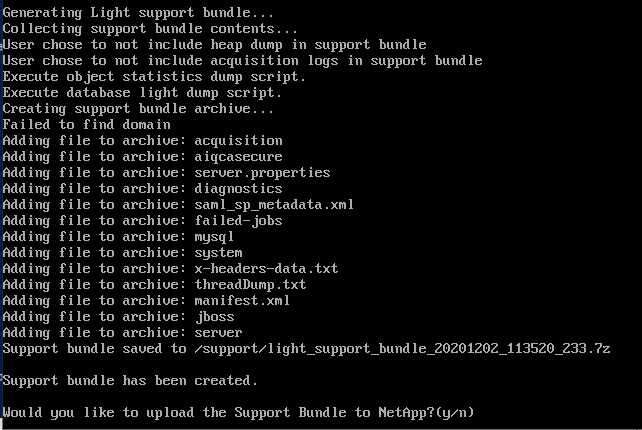
- あなたのテクニカルサポート ケース番号を入力してください。
- アップロードが完了したら、いずれかのキーを押してエスケープし、Maintenance Consoleメニューに戻ります。

11.サポートバンドルをNetApp Supportにアップロードしない場合や、アップロード機能があるバージョンのUnified Managerを使用していない場合は、サポートバンドルをOVAから移動し、NetApp Supportにアップロードできるようにする必要があります。サポートバンドルを収集するために、SFTPまたはSCPプロトコルを使用してサポートバンドルをダウンロードします。
- 推奨サードパーティプログラム
- FileZilla
- WinSCP
- ログイン時はmaintenanceユーザを使用してください。
- または、LinuxまたはUnixホストのコマンドラインから、ユーザは次のコマンドを使用できます。サポートバンドルが生成されたときに指定された名前を使用してください(参照については前のスクリーンショットを参照してください)。
sftp <maintenance-user>@some-ocum-vapp:/support/support_bundle_20130501_140827_844.7z <destination directory>scp <maintenance-user>@some-ocum-vapp:/support/support_bundle_20130501_140827_844.7z <destination directory>
サポートバンドルをダウンロードしたら、Knowledge Article How to upload a file to NetAppを使用してください。