共有ロックが存在する場合、権限エラーでフォルダにアクセスできません
適用先
ONTAP 9
問題
- ユーザに十分な権限があっても、CIFSを使用してエクスプローラからフォルダにアクセスしたり削除したりできない。
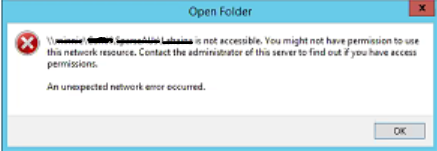
- ファイルの所有権を取得することはできません
- クライアントIP用に収集されたSectraceには、「Access is denied because a delete is pending on this object」と表示されます。
::> vserver security trace trace-result show -vserver SVMNAME
 Vserver: SVMNAME
Node    Index   Filter      Details        Reason
 --------------- ----- -------------------------- ------------------------------
 Node1    1    Security Style:    -      Access is denied because a delete is pending on this object.
          Protocol: cifs
          Volume: -
          Share: test
          Path: /test/folder
          Win-User: Domain\username
          UNIX-User: root
          Session-ID: 1664080010000003555
- ロック ステータスを確認:
::> vserver locks show -vserver SVMNAME -path /test/folder
Notice: Using this command can impact system performance. It is recommended
 that you specify both the vserver and the volume when issuing this command to
 minimize the scope of the command's operation. To abort the command, press Ctrl-C.
Vserver: SVMNAME
 Volume   Object Path     LIF      Protocol  Lock Type     Client
 -------- ------------------------- ----------- --------- ----------- --------------
 VOLNAME
      /test/folder   test_LIF1   cifs   share-level   10.216.41.xx
                              Sharelock Mode: read-deny_none
- locks showの出力でクライアントIPが見つかった場合は、以下のコマンドを実行してクライアントIPを使用してセッションが確立されているかどうかを確認します。
::> vserver cifs session show -vserver SVMNAME -address <Client IP> -instance
- パケット トレースは、フォルダーへのアクセス中に STATUS_DELETE_PENDING を示します。
Number Date       Source      Destination   Protocol    Info
 223727 2020-05-12  10.216.xx.xx  10.216.41.20   SMB2     Create Request File: \folder
 223744 2020-05-12  10.216.xx.xx  10.216.41.10   SMB2     Create Response, Error: STATUS_DELETE_PENDING