メインコンテンツへスキップ

REST API を使用して BlueXP で NSS 認証情報を更新する方法

Views:
66
Visibility:
Public
Votes:
0
Category:
netapp_console
Specialty:
ds_cvo
Last Updated:

環境

  • BlueXP(以前はNetApp Cloud Manager)
  • NetApp Support Site (NSS)
  • REST API

概要

この記事では、Cloud Manager で既存の NSS 認証情報を更新する方法について説明します。

手順

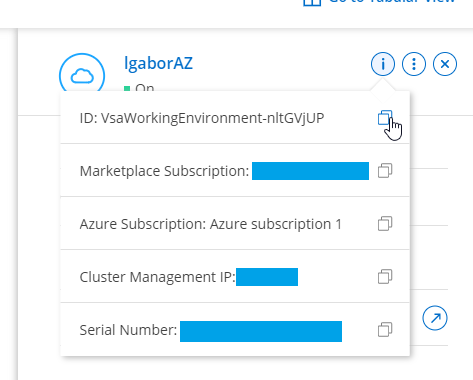
  1. Cloud Manager SaaS UIにアクセスしてCanvasに移動します。> WorkingEnvironmentをクリックします。> clipboard_eb1766753843ff56f2ac04ba0f8d23a42.png をクリックして、WorkingEnvironment IDをコピーします

2021-07-15 13_47_07-Window.png


  1. Cloud Manager SaaS U Iでquestion mark.png > Support > NSS Management に移動し、NSS アカウント IDをコピーします

clipboard_e593d4171344f9b68747f9b534c99cfaa.png


  1. Connector のローカル UI に切り替えて、Swagger UI
  2. に移動して展開します アカウント操作

clipboard_ee44bc054d9ed040d7a29d9eae441b06e.png


  1. 以下のAPI操作を展開します。

​​​​​clipboard_e4a142bb52f57f7081776f14ae3a4eaa5.png


  1. 手順2で収集したNSS アカウントpublicIDをコピーします:

clipboard_e4a913c248f54c6602833f6acc65c4c9a.png


  1. Model Schema をクリックし、 Model Schemaの下にあるボックス(Click to set as parameter value)の内部をクリックします
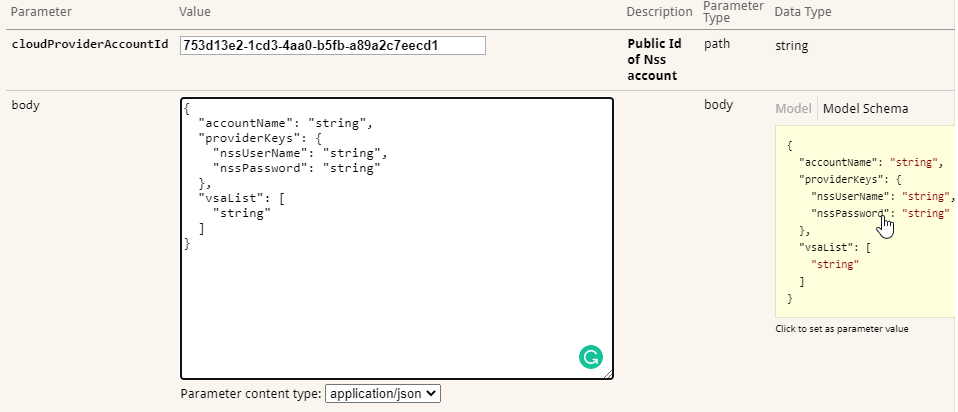
clipboard_e383e648dced0f47ebe4c1fcae1709409.png


  1. "string"を現在の情報または新しい情報に置き換えてください。手順1で収集したWorkingenvironmentID"vsaList"に入力し、Try it out!を押してください。

clipboard_e9ad84d5d5761ba9a8a2a0478efae0d66.png

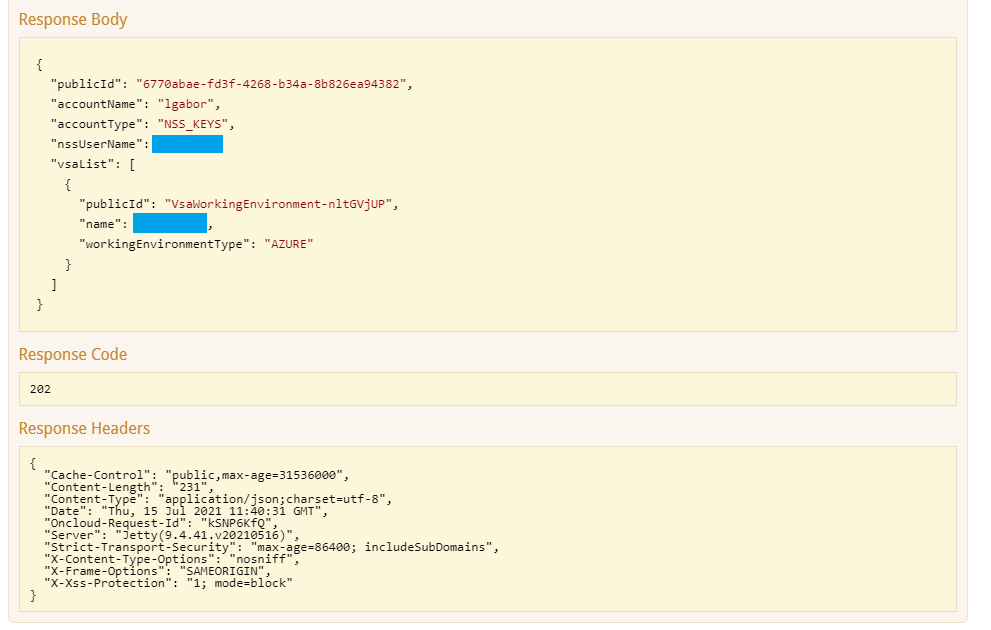
  1. 期待されるレスポンス:

2021-07-15 13_55_00-Window.png

    ​​​​​​

    内部情報

    Sign in to view the entire content of this KB article.

    New to NetApp?

    Learn more about our award-winning Support

    NetApp provides no representations or warranties regarding the accuracy or reliability or serviceability of any information or recommendations provided in this publication or with respect to any results that may be obtained by the use of the information or observance of any recommendations provided herein. The information in this document is distributed AS IS and the use of this information or the implementation of any recommendations or techniques herein is a customer's responsibility and depends on the customer's ability to evaluate and integrate them into the customer's operational environment. This document and the information contained herein may be used solely in connection with the NetApp products discussed in this document.